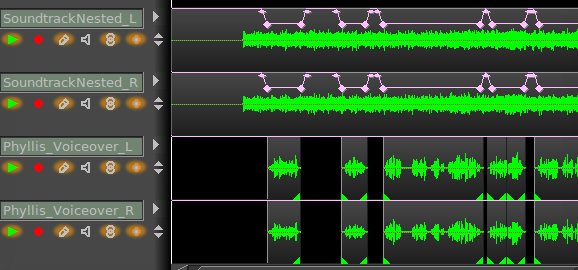
Hi,
I'm trying to to audio-ducking. That is, I have some music on two tracks (stereo), and now I want to use a third track (voice-over) as input to the compressor so that the background music is attenuated when the voice-over is speaking without affecting the voice-over. I think this should be possible with shared effects and/or shared channels, but I can't figure it out from the documentation.
Is this possible? And if so, how?
Thanks!
Have you tried the Ladspa plugins, L_SC2 or L_SC3? I am not fluent in using either one, just saw the info on each containing the word "sidechain". Unfortunately the ffmpeg plugin, sidechaincompress which does audio ducking, has been commented out in CinGG due to input/output error. In addition, there may be LV2 plugins that you can incorporate into CinGG that provide sidechain compression. Maybe someone else will know how to do this and respond.
I'm sorry, but I'm not very knowledgeable about the audio side of editing. The only time I've done something like audio ducking, I did it manually using keyframes and the fade curve on the audio tracks.
As @andreapaz, I do it "by hand", more precise, more control.
Picture added